A busy Saturday lunch service can expose the weak points in any manual process. An order is misheard, a modifier is missed, the wrong price is entered, or a payment is put through twice. These are usually honest mistakes, but they cost time, stock, and customer confidence. So, can an epos system help reduce staff errors? For many independent businesses, the answer is yes, provided the setup matches how the team actually works.
An EPOS system will not remove the need for training or careful service. What it can do is take repetitive decisions, handwriting, mental arithmetic, and duplicate entry out of the process. That gives staff clearer prompts and gives owners a more reliable record of what happened.
Can an epos system help reduce staff errors at the point of sale?
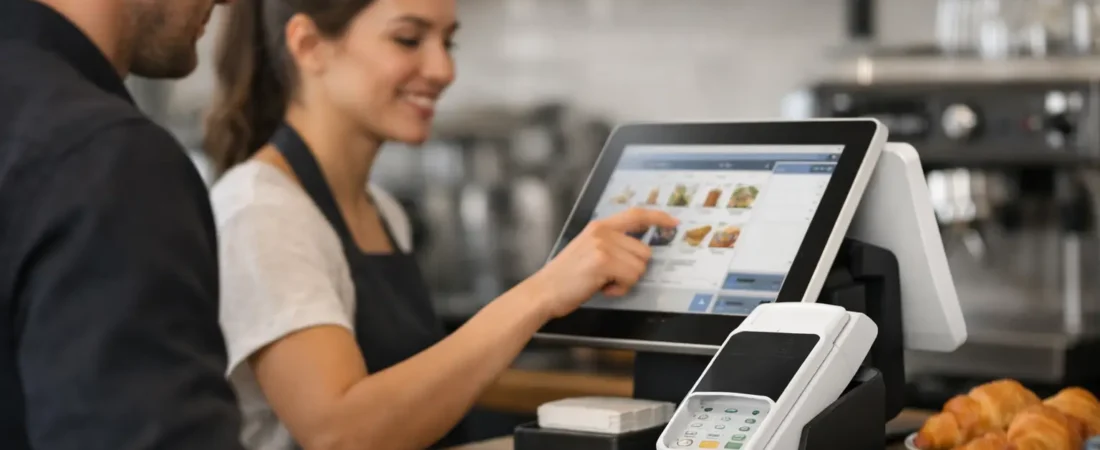
The most immediate benefit is consistency. Instead of typing a price from memory or looking for a handwritten note, staff select the product from a clear menu. The item, price, tax treatment, and any available variations are already set up in the system.
For a café, that might mean choosing a latte, then selecting oat milk and an extra shot. For a salon, it could mean selecting a particular treatment, stylist, and add-on. For a retail shop, it may be scanning a barcode rather than searching for an item or manually entering a price.
This matters because small errors at the till can be difficult to spot later. A staff member may accidentally charge for a regular coffee rather than a large one, apply an old price, or select the wrong service. A well-organized EPOS product list reduces the number of choices that rely on memory.
The system should be simple enough for a new team member to use confidently. A screen crowded with too many buttons can create its own problems, so menu design matters. Popular items should be easy to find, while less common items can sit in sensible categories.
Clear orders reduce costly misunderstandings
Handwritten tickets and verbal orders often cause problems when a business is busy or noisy. A customer may ask for no dairy, a gluten-free option, a change of side dish, or a specific table number. If that detail is unclear, the kitchen or service team has to guess, ask again, or remake the order.
With handheld ordering or a countertop register, staff can record modifiers as the customer speaks. The order can then go directly to a kitchen display or printer with the relevant details attached. This creates one shared version of the order rather than several handwritten interpretations.
A restaurant or pub can also use table management to show where an order belongs and whether a table is open, waiting for food, or ready to pay. That can reduce the familiar mistake of food or drinks being taken to the wrong table. In a hotel or guest house, the same principle can help staff keep room charges and food orders clearly separated.
There is a trade-off. Too many compulsory prompts can slow down a straightforward sale. The aim is not to make every transaction feel like paperwork. It is to require confirmation only where it prevents a common and expensive error, such as allergens, cooking instructions, or table allocation.
Can an epos system help reduce staff errors in payments?
Payment errors are especially frustrating because they affect both the customer and the daily takings. Separate card terminals and cash registers can work well, but they can also create opportunities for the wrong amount to be keyed into one device or the other.
An integrated payment and EPOS setup can send the sale total directly to the card terminal. Staff do not need to enter the amount twice, which reduces the risk of a misplaced decimal point or a mismatch between the sale record and card payment. It can also make end-of-day reconciliation quicker because payment records are linked to the transactions recorded at the register.
Refunds and voids deserve the same care. An EPOS system can give authorized staff a clear route for processing them, while recording the reason and user account. This is not about treating staff with suspicion. It gives the owner a useful audit trail and makes it easier to resolve a customer query without relying on recollection.
Permissions should reflect each role. A new front-of-house employee may need to take orders and payments, while a manager handles price changes, refunds, cash adjustments, and reports. Clear permissions reduce accidental changes to important settings and help owners see where further coaching may be useful.
Stock records make errors easier to spot
For businesses selling physical products, stock control can reveal mistakes that would otherwise stay hidden. When an item is sold through the register, stock levels can update automatically. That reduces the need to deduct every sale manually at the end of the day.
A bakery, farm shop, boutique, or florist can use this information to identify when a product is selling faster than expected or when the stock count does not match sales. The difference may point to a receiving error, waste, a misplaced item, or an incorrect product button rather than a serious issue. Either way, it is easier to investigate while the details are still fresh.
Stock features need accurate starting information. If products are entered with the wrong quantities, descriptions, or variants, the reports will only repeat those inaccuracies. Regular stock checks remain valuable, particularly for high-value, seasonal, or fast-moving lines.
Reporting turns repeat mistakes into practical improvements
A good EPOS system does more than record a sale. It helps an owner see patterns. If one product is frequently voided, for example, the issue could be an unclear button label, a price that has not been updated, or a staff training gap. If discounts are regularly applied at one time of day, it may be worth checking whether the offer is being used correctly.
Sales reports can also show which items sell together, which staff shifts process the most refunds, and whether particular payment types are causing delays. The purpose is not to judge people from a spreadsheet. It is to find process problems before they become routine.
For a business owner with limited time, this can be more useful than a pile of receipts and handwritten notes. Clear daily totals, product sales, payment breakdowns, and staff activity make it easier to ask specific questions and make small adjustments.
How to set up an EPOS system to prevent errors
The quality of the setup matters as much as the equipment. Before choosing features, list the errors that currently happen most often. They might include wrong prices, missed modifiers, incorrect table numbers, duplicate card entries, stock discrepancies, or difficulty tracking refunds.
Then build the system around those real issues. Use plain product names that staff recognize. Group items logically. Add modifiers only where they are needed. Check that prices, taxes, and discount rules are correct before the system goes live. It is also sensible to test common scenarios, including split bills, refunds, online or phone payments where applicable, and a busy-service order.
Training should include the reason behind the process, not just which button to press. Staff are more likely to follow an allergen prompt or table-selection step when they understand how it prevents a wrong order. Short refresher sessions after the first few weeks can be more effective than trying to explain every feature on day one.
The right system supports people, rather than replacing care
Can an epos system help reduce staff errors? Yes, but it works best as a practical support for a capable team. It can standardize prices, capture order details, connect payments, improve stock visibility, and make recurring issues easier to identify. It cannot correct unclear procedures, outdated menus, or insufficient training by itself.
For independent businesses, the most suitable EPOS system is usually the one that solves the everyday problems without adding unnecessary complexity. A café may benefit most from quick order modifiers and integrated payments. A restaurant may prioritize handheld ordering and kitchen communication. A shop may need barcode scanning and stock reporting. The right answer depends on the business, its staff, and its busiest moments.
If staff errors are taking time away from customers or creating avoidable admin, Richard Bradley at Dorset Business Hub can review your current payment and EPOS setup with you. For a friendly, no-obligation conversation, call 07377 625228 or use the Dorset Business Hub contact page to arrange a review that focuses on the way your business operates.

Let’s Talk About Your Business
Hi, I’m Richard Bradley, your local SumUp Business Partner .
I help independent businesses across Dorset reduce card payment costs, choose the right card machines and EPOS systems, and receive honest, local advice.
Questions about this article? Looking to reduce your card payment costs? Book your free, no-obligation payment review today.
✓ Local Dorset Business Partner ✓ Free Payment Review ✓ No Obligation
Book Your Free Payment Review