A busy Saturday service can expose the weak points in any ordering process. Guests are waiting to catch a server’s eye, staff are moving between tables and the bar, and handwritten notes or verbal changes can easily be missed. If you are asking, “should my restaurant use qr code ordering?”, the useful answer is not simply yes or no. It depends on the kind of experience you want to offer and whether the system supports your team rather than creating another job for them.
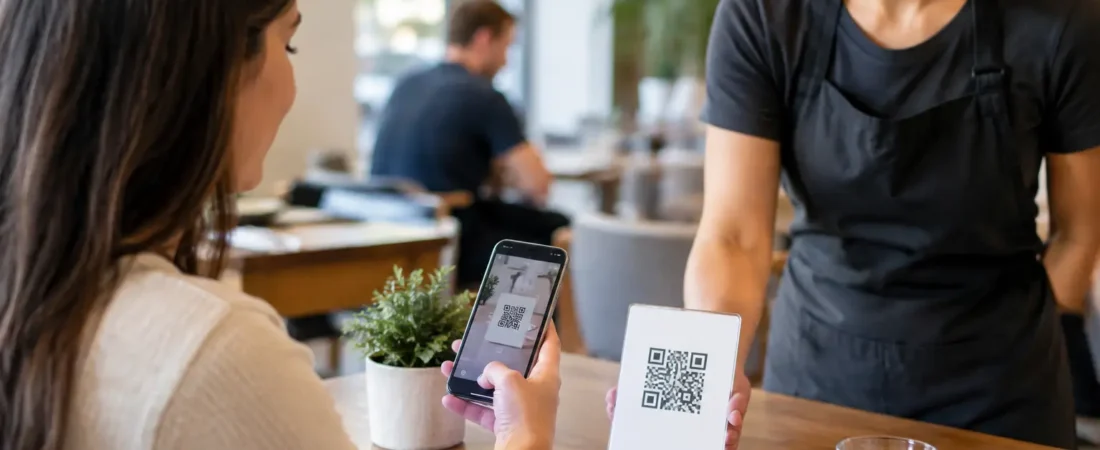
QR ordering allows guests to scan a code at the table, view a menu on their phone, place an order and, in many setups, pay at the same time. The order can then go directly to the kitchen, bar, or EPOS system. For some independent restaurants, cafés, and pubs, this removes pressure at the busiest points of service. For others, it can feel out of step with a more personal style of hospitality.
Should my restaurant use qr code ordering? Start with service
The first question is not whether QR codes are fashionable. It is where service is slowing down now.
If staff regularly spend the first ten minutes of a sitting taking drinks orders, QR ordering may let guests order promptly while your team focuses on welcoming people, answering questions, and delivering food. It can work particularly well for casual dining, coffee shops, pubs with food, outdoor seating, counter-service venues, and businesses with a high turnover of tables.
It can also reduce the queue that forms when one member of a group walks to the bar to order for everyone. Each table has a clear route to order, and the kitchen receives details in a consistent format.
However, QR ordering is less suitable when the table interaction is central to the offer. A small fine-dining restaurant, for example, may want staff to explain the menu, suggest wine, check dietary requirements in person, and pace the meal carefully. In that setting, QR ordering might be useful as an optional way to pay, rather than the main way to order.
The goal should be to remove avoidable waiting, not to remove hospitality.
The practical benefits for an independent restaurant
When QR ordering is connected properly to your EPOS setup, it can save time in several ordinary but valuable ways. Orders arrive without staff having to re-enter them from a pad or memorize a list while walking to a terminal. This can reduce manual-entry errors, especially with modifiers such as extra toppings, sauce choices, or allergy notes.
A digital menu is also easier to keep current. If an item sells out, it can be marked unavailable rather than leaving staff to explain it repeatedly at the table. You can update prices, add specials, or change a lunchtime menu without printing new copies.
Payment at the point of order can improve cash-flow visibility too. Guests who have already paid are less likely to hold up a table at the end of the meal, particularly when several people want to split a bill. Your team can concentrate on clearing and resetting tables rather than chasing payments during a rush.
The reporting side matters as well. An integrated system can show which items sell at particular times, how much guests spend per order, and which tables or service periods are busiest. These details help you make better decisions about staffing, menu design, stock, and promotions. They are most useful when they are simple enough to review regularly, not buried in complicated reports.
The drawbacks to consider before you switch
Not every guest wants to order through a phone. Some will prefer to speak to a person, may not have a suitable device, or may have poor signal or limited battery. A restaurant should always provide a straightforward alternative, whether that is table service, ordering at the bar, or a member of staff with a handheld device.
There is also a risk of making the ordering process too impersonal. A QR code placed on every table does not automatically improve the customer experience. If guests cannot ask an easy question, cannot find key menu information, or feel they have been left to work everything out alone, the convenience disappears.
Menu design needs attention. A paper menu can be scanned in seconds. A digital menu with too many taps, unclear categories, or lengthy item descriptions can frustrate customers. Test it with people who have not seen it before, including staff and regular customers. Can they find a dish, add a change, and complete payment quickly?
Finally, think about the cost and operational fit. QR ordering should not sit separately from your kitchen workflow, stock information, and payments if that means staff have to check several screens or reconcile orders manually. The value comes from a setup that reduces duplicate work.
Should my restaurant use qr code ordering for every table?
Usually, no. An all-or-nothing decision is rarely necessary.
Many restaurants get better results by offering QR ordering as a choice. A code can allow guests to view the menu, call for assistance, order another round of drinks, or pay when they are ready. Staff can still greet tables, take the first order where appropriate, and help anyone who would rather not use a phone.
This blended approach is often practical for pubs and restaurants with different areas. QR ordering may suit a terrace, beer garden, lounge, or family area where customers are spread out. Traditional table service may be better in a smaller dining room where the relationship with the guest is part of the experience.
Consider the time of day too. A café may benefit from quick QR ordering at a busy lunch period, while a quieter evening service may call for more personal attention. Your system should support the way you actually trade, rather than forcing every service into the same pattern.
What a workable setup looks like
A QR code on the table is only the visible part of the process. Behind it, the ordering journey should be clear for guests and staff.
First, each code must match the right table or area. This avoids confusion when food runners deliver orders and gives you useful table-level sales information. The menu should show accurate availability, item options, prices, and any information your business chooses to provide about ingredients.
Next, orders need to reach the right place. Drinks may need to appear at the bar while food goes to a kitchen display or printer. If you offer collection as well as table service, those orders should be clearly separated. Staff should be able to see new orders quickly and know whether they have been paid.
Finally, give staff a simple way to step in. They may need to amend an order, add an item for a guest who is not using QR ordering, issue a refund where appropriate, or deal with a customer request. Training matters here. A good system is not one that never needs human help. It is one that makes help quick and clear when it is needed.
Try it before changing the whole restaurant
If you are unsure, start with a limited trial. Use QR ordering in one area, during a particular service, or for drinks and desserts first. Watch what actually happens rather than relying only on assumptions.
Look at order times, kitchen pressure, average spend, staff feedback, and guest comments. Are fewer people waiting to order? Are there fewer corrections? Has the team gained time to provide better service, or are they spending it explaining the technology?
It is also worth checking how QR ordering works during the situations that put your operation under pressure: a full dining room, a large group, an item selling out, a temporary internet issue, or a guest with a specific request. A sensible backup process protects service when technology is not the right answer.
Choosing the right support and EPOS fit
The right decision is not just about a QR ordering feature. It is about whether payments, ordering, kitchen communication, table management, and reporting work together in a way your team can learn and use confidently.
For independent restaurants, local setup and training can make a real difference. A system may look straightforward in a demonstration, but the important test is how it works when staff are new, the kitchen is busy, and customers are waiting. Having someone review your current process, configure the system around it, and provide ongoing support can prevent avoidable disruption.
If you are considering QR ordering for a restaurant in Dorset or the wider South West, Richard Bradley at Dorset Business Hub can review how you take orders and payments now, then talk through suitable options without obligation. Contact Dorset Business Hub or call Richard on 07377 625228 for a practical discussion about your current payment or EPOS setup. The right next step may be QR ordering, a handheld device, a better table layout, or simply a clearer process for the team you already have.

Let’s Talk About Your Business
Hi, I’m Richard Bradley, your local SumUp Business Partner .
I help independent businesses across Dorset reduce card payment costs, choose the right card machines and EPOS systems, and receive honest, local advice.
Questions about this article? Looking to reduce your card payment costs? Book your free, no-obligation payment review today.
✓ Local Dorset Business Partner ✓ Free Payment Review ✓ No Obligation
Book Your Free Payment Review